As Jeff mentioned in a previous post, having a USB reader for your DoD Common Access Card (CAC) can be very helpful if you travel or work from home. Even if you're just trying to keep your inbox from filling up while you're on vacation, having one of these handy little devices is essential for accessing your Outlook Web Access (OWA) email while you're away from the office. If you're like me and don't like spending money on anything you don't have to spend it on, keep reading...things just got cheaper. The CAC reader recommended in the previous post has been drastically reduced in price. They're currently going for about $10 LESS than they were just a couple of months ago. (Just under $15 is the current price). Check out the CAC reader and Jeff's post from January. Don't forget, every organization has different rules on the use of OWA and accessing DoD networks from home (or on the road), so check with your local Information Assurance Manager or Network Security section before you do anything.
Sunday, March 28, 2010
USB CAC reader - OWA from home
As Jeff mentioned in a previous post, having a USB reader for your DoD Common Access Card (CAC) can be very helpful if you travel or work from home. Even if you're just trying to keep your inbox from filling up while you're on vacation, having one of these handy little devices is essential for accessing your Outlook Web Access (OWA) email while you're away from the office. If you're like me and don't like spending money on anything you don't have to spend it on, keep reading...things just got cheaper. The CAC reader recommended in the previous post has been drastically reduced in price. They're currently going for about $10 LESS than they were just a couple of months ago. (Just under $15 is the current price). Check out the CAC reader and Jeff's post from January. Don't forget, every organization has different rules on the use of OWA and accessing DoD networks from home (or on the road), so check with your local Information Assurance Manager or Network Security section before you do anything.
Thursday, January 14, 2010
Checking your email via Outlook Web Access (OWA) using your DoD CAC Card
Training:
Most agencies will have mandatory or at the very least, recommended training. The training should address the importance of dealing with personally identifiable information (PII)
Anti-Virus Software:
There is no reason for a DoD employee to not have valid anti-virus protection on your home computer. Especially since the DoD has free anti-virus software for home use. In fact if you plan on using OWA it would be negligent to not have a legitimate updated AV product installed...
“The DoD Antivirus Software License Agreement with McAfee and Symantec allows active DoD employees to utilize the antivirus software for home use. Home use of the antivirus products will not only protect personal PCs at home, but will also potentially lessen the threat of employees bringing malicious logic into work and compromising DoD networks. Contractors are excluded from using the software at home or on any other system not belonging to the DoD.
Note: You will NOT be able to download software if your domain is not a *.mil domain.
No technical support is provided for home users. If you have questions about the software, please contact the vendors directly for support. “
Software can be downloaded from the following site: (please remember that you have to download this software from a computer on a .mil domain.) https://www.jtfgno.mil/antivirus/antivirus_homeuse.htm
CAC Card Reader:
This is generally not provided by the DoD. You will most likely have to purchase one if you want to use OWA. You can get an entire keyboard
Middleware:
This is the software that allows you to use your CAC card with the CAC Card Reader to check OWA. Most agencies will have a link that you can download this from. Check with your Information Assurance section to determine how to download the software. Most DoD agencies are using ActivClient. The most recent version is 6.2; this will work for both 32 and 64 bit computers.
We are not associated with any DoD agency.
Saturday, December 26, 2009
Samsung New PC Studio and Microsoft Windows 7
From the error messages displayed, it was failing to install the drivers for the phone. So after searching both Samsung’s site and AT&T’s site for Windows 7 specific drivers, I couldn't find any that looked trustworthy.
I had to make Windows 7 run the software while essentially fooling the software into believing that it wasn’t being installed on Microsoft’s newest operating system.
The first thing I did was go to the Samsung Mythic website and get the latest version of the software.
Saturday, December 12, 2009
Pay Attention to Changes to Facebook Privacy Settings
Facebook introduced changes in their privacy settings this week under the guise of making these settings more customizable and granular for their users. I tend to think there are other reasons, but we'll leave that discussion to the dozens of other blogs and media outlets that are beating that drum this week. My focus in this posting is simply to make Facebook users (current and future) aware that by default there is very little privacy when using Facebook.
First, let's talk about what kinds of data you might have within your Facebook account.
First Name
Last Name
Phone Number
City of Residence (this could also be the city in which you were born)
State of Residence (this could also be the state in which you were born)
Birthdate
Employer/School
Sex
Religious views
Political views
Email address
Photos of you
Videos of you
Your daily activities and/or geographic location (depending on how much you offer in your status updates)
Job title
Relationship status (and the name of your significant other, if applicable)
Favorite movies, TV shows, music, books, etc
etc.
etc.
etc.
Now that you see the list above all in one place, doesn't seem like an excessive amount of information to be giving away? It does to me. I can't see why there is a legitimate need to share this amount of information with so many people. But then I guess that depends on your personal thoughts on the subject and, as we'll see later in this post, how you have your privacy settings configured on Facebook.
Who sees this stuff? That also depends on how you have your Facebook privacy
Who has an interest in this kind of information? Identity thieves
Alright, so I've scared a few of you, open the eyes of some of you, and lost the rest of you. Well pay attention, the good stuff is up next. Let's take a good look at the settings that Facebook "recommends" that you accept.
Click on Settings at the top of the Facebook page and then select Privacy Settings and you'll see a page like this:
The first area to consider is the Profile Information section. This will show you the details of all the things you're sharing, and with whom. Things like birthday, relationship status, and employer can be found here. I suggest setting all of them to Only Friends. You can even set them to Only Me or to specific users by selecting the Customize option.
The Contact Information section allows you to specify who can view your phone number, email addresses, website url, IM screen names, etc. These settings can also be set to be available to a many or as few people as you like, but I suggest that they be restricted to Only Friends at a minimum.
The next section is one that I think is widely overlooked. The Applications and Websites area is one that can protect or expose a ton of your personal information. In some cases, this exposure can take place without your knowledge or participation.
For starters, click on the Learn More button next to the What You Share section. Read it. Understand it. Please don't take it lightly. When you use applications in Facebook, you are agreeing to let the developers of those applications have access to your personal information to do with it whatever they wish. Photos, personal data, email addresses, birthdates, children's names, etc. All of these things (and more) are surrendered when you use a third party application within Facebook. The What You Share section will help you understand this. Read it. Understand it. Did I mention identity theft? Yeah, see, you have no idea who wrote those applications you're using. Quizzes? Games? Send a friend a drink or a gift? Yeah, those are the applications I'm talking about. You have no idea who wrote them, why they wrote them, and what parts of your personal data they're taking for their own use (or to sell to someone else).
Another good place to keep an eye on is the What Your Friends Can Share About You. Click on the Edit Settings button for this section and find all the ways (and there are many) that someone you're friends with on Facebook can agree to give away YOUR personal data. That's right, you don't even have to give away your own personal information. An unsuspecting friend of yours can do it for you, saving you the trouble. Nice, huh? Do yourself a big favor...go to this section and un-check every box you see. There is no reason that any of your friends' activities should result in the exposure of your personal information. Can you say identity theft?
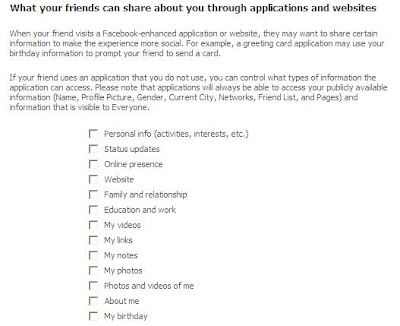
The last two sections of the Applications and Websites area will allow you to view and edit applications you have blocked or edit which invitations you have previously chosen to ignore. These areas are pretty self explanatory (by now you're getting pretty good at this stuff anyway, huh?).
So, are you a little more paranoid than you were at the beginning of this post? Good, then my work is done here. Remember, privacy is a right that must be guarded and protected. Don't give away personal information unless it is absolutely necessary. And when it comes to Facebook, it's never necessary.
Thursday, December 10, 2009
XP Backup Utility from Connected Solutions
So you’re cheap and lazy, but realize you still need to backup some of your most valuable files. All that clutter you have on your desktop that you keep telling yourself to organize. Those pictures you’ve been meaning to make copies of before your next life-altering hard drive failure. And then there’s the stuff you never think about until you don’t have it. When’s the last time you backed up your Internet Explorer favorites? Yeah, that’s what I thought. We’re all guilty of putting these things off. So what should you do about it? Connected Solutions to the rescue!
With a little help from Simon Sheppard’s website (http://ss64.com/nt) we’ve developed a simple backup solution. This is nothing more than a batch file which will prompt you for the drive letter of your backup device and then make copies (uncompressed) of “My Documents”, “Favorites”, and “Desktop” of the current user to that backup device. USB Thumb drive? No problem. Firewire external hard drive? No problem. Network storage device? No problem. Anything that has a drive letter will work (assuming sufficient storage space is available on the target device.) This utility will create a folder on the target drive called “Backup”. Within that folder it will create a subfolder for each backup event and name the individual folders based on date, time, and username. For example, “2009-11-20-0946-BillyBob.Jones” (without the quotes) would be the name of the folder created when BillyBob Jones’ backup ran on November 20th 2009 at 9:46AM. Pretty simple, huh?
Currently this is only available for Windows XP (and it may work on Windows 2000, too, but we haven’t tested it). In the near future we plan to create a version for use with Vista and Windows 7.
REM Backup utility developed by Connected Solutions (www.Solutions29.com) 11/04/2009
@echo off
echo.
echo.
echo This backup utility will make a copy of the following folders on the backup drive of your choice:
echo My Documents
echo Favorites
echo Desktop
echo.
echo To ensure a successful backup all open programs must be closed now...
echo.
echo.
Pause
FOR /F "TOKENS=1* DELIMS= " %%A IN ('DATE/T') DO SET CDATE=%%B
FOR /F "TOKENS=1,2 eol=/ DELIMS=/ " %%A IN ('DATE/T') DO SET mm=%%B
FOR /F "TOKENS=1,2 DELIMS=/ eol=/" %%A IN ('echo %CDATE%') DO SET dd=%%B
FOR /F "TOKENS=2,3 DELIMS=/ " %%A IN ('echo %CDATE%') DO SET yyyy=%%B
REM The following code was found on Simon Sheppard's website, http://ss64.com/nt/
SETLOCAL
For /f "tokens=1-3 delims=1234567890 " %%a in ("%time%") Do set "delims=%%a%%b%%c"
For /f "tokens=1-4 delims=%delims%" %%G in ("%time%") Do (
Set _hh=%%G
Set _min=%%H
Set _ss=%%I
Set _ms=%%J
)
:: Strip any leading spaces
Set _hh=%_hh: =%
:: Ensure the hours have a leading zero
if 1%_hh% LSS 20 Set _hh=0%_hh%
Echo The time is: %_hh%:%_min%:%_ss%
ENDLOCAL&Set _time=%_hh%%_min%
REM End of code found on Simon Sheppard's website, http://ss64.com/nt/
SET /P TargetDriveLetter=Enter the drive letter of your backup device:
SET date=%date:~10,4%_%date:~4,2%_%date:~7,2%_%_time%_%UserName%
md %TargetDriveLetter%:\Backup\%date%
xcopy "%UserProfile%\Desktop\*.*" "%TargetDriveLetter%:\Backup\%date%\Desktop\*.*" /e
xcopy "%UserProfile%\Favori~1\*.*" "%TargetDriveLetter%:\Backup\%date%\Favorites\*.*" /e
xcopy "%UserProfile%\MyDocu~1\*.*" "%TargetDriveLetter%:\Backup\%date%\My Documents\*.*" /e
xcopy "%UserProfile%\Application Data\Microsoft\Outlook\*.*" "%TargetDriveLetter%:\Backup\%date%\OutLook Files\*.*" /e
echo.
echo.
echo Your backup is complete
echo Your backup location is: %TargetDriveLetter%:\Backup\%date%
echo.
echo This utility developed by Connected Solutions (www.Solutions29.com)
pause
Feel free to copy the code above into a batch file or just download a zipped one from here.
Friday, September 11, 2009
Risk Analysis from a CISSP's view point.
Remember we are using a fictional set of circumstances to illustrate this example.
You are a CISSP working for a nationwide auto parts recycler that is headquartered in Memphis, Tennessee. The warehouse at this location is located at 21 feet above normal Mississippi River level. Research tells us that the river level will flood to 30 feet above normal river level once every 10 years.
Your warehouse consists of three levels of shelving starting at the ground level with shelves separated by a height of 10 feet. The inventory value of the entire warehouse is $10 million dollars. The total value of product on the ground level is approximately $3 million dollars. Research has shown that the cost to replace the all product on the ground level as well as cleanup, maintenance, and lost business will be 40% of inventory value.
Flood insurance on this warehouse would cost $50,000 per year with $10,000 deductible per occurrence.
AV: Asset Value. For us this will be the value of the inventory or $10 million dollars.
EF: Exposure Factor. This is expressed as a percentage. Based on the scenario, this is 40%.
SLE: Single Loss Expectancy. Every time a flood occurs, you can expect that it will cost your business 40% of inventory value ($10 million dollars) or an SLE of $4 million. This is accomplished with the following equation. SLE = AV ($) * EF (%) or 10,000,000 x 0.40 = 4,000,000
ARO: Annual rate of occurrence. Since the event that we are considering purchasing insurance for (river flooding) only occurs once per ten years, we get 1/10 or an ARO of 0.1
ALE: Annualized Loss Expectancy. What is your annual cost of an every 10 year event?
If we use the equation ALE = SLE x ARO ,we get $4,000,000 x .1 for an ALE of $400,000.
Would you recommend the insurance to management? Lets do the quick math on this to see if would be a good idea.
Insurance costs $50,000 per year for 10 years equals $500,000 plus an additional $10,000 for the deductible. This would make $510,000 every ten years.
Friday, July 24, 2009
PC Security Recommendations
At a bare minimum, your computer should have an anti-virus and firewall application on it. Remember that you should always keep your computer up to date on service packs, hot fixes, patches, anti-virus, and firewall definitions in order to ensure that it remains as secure as possible.
If you have any questions on the items we have recommended, please feel free to send us an email.
Disclaimer: Due to the nearly unlimited possible combinations of hardware and software, we cannot guarantee that these items will work for you. We do not receive any funding or kick backs for these recommendations.
Anti-Virus -
AVG Free Anti-Virus has been around for quite a while and has proven themselves to be trust worthy. This can be configured to download the most recent AV definitions automatically.
Spyware and Ad-ware Removal -
Ad-Aware Free has an excellent reputation in their respective field.
Spybot Search and Destroy is another great tool that in addition to removing unwanted spyware and adware from your pc, it can prevent it from being installed in the first place.
Firewall -
ZoneAlarm is another of those products that has an excellent reputation.
System Optimization, Privacy and Cleaning -
CCleaner is a tool that I use all the time. It is a very powerful application that helps keep my computer running well. One of the nice features with this one is that it can be set to check for
updates for itself.
Disk Defragmentation -
Defraggler has a funny name, but on occasion I have found that this would defragment a hard drive better that the built-in defragmenting tool. This tool can also be set to check for updates to itself.
File Recovery -
Recuva is another very handy tool when you have deleted a file and need it back. While it may not be able to recover all deleted files, it does an excellent job and is easy to use. This tool can also be set to check for updates to itself.
Even though the software listed above is free, if you find that it works well for you, please feel free to visit the manufacturers respective sites and make a donation to help keep the software free.


